
FAQ
Quick answers about ordering custom GripPlan inserts.
Installation & Care GuideReady to install your insert?See setup steps, drawer installation guidance, adhesive instructions, cleaning tips, and safe removal advice.Using the Configurator
Do you have Milwaukee PACKOUT and DEWALT ToughSystem templates?
Yes. Browse Milwaukee PACKOUT and DEWALT ToughSystem insert outlines by brand and model in the web builder. Choose an outline, then customize the pockets for your tools. Check the dimensions against your exact case or drawer and select a suitable foam thickness; a template does not guarantee fit for every model. You can also start with custom dimensions.
Is the web builder easy to use without CAD experience?
You do not need CAD experience or a software download. Start with a template or your own dimensions, add shapes or trace tools from a photo, then arrange the pockets and preview your layout in 3D. A live estimate updates as you design. Use a tablet or desktop, and follow the Photo Trace guide for help photographing and measuring your tools.
What devices work best with the configurator?
The full GripPlan configurator is designed for a tablet or desktop. It works best when the drawing canvas and control panels can stay visible together, so we recommend a tablet at minimum and a desktop or laptop for the most comfortable editing experience. Phones can still browse the site, view saved designs, and handle general account tasks, but the full configurator is not intended for small phone screens.
Can I cover a larger drawer or case with multiple inserts?
Yes. Larger drawers and cases can be covered by placing multiple inserts next to each other. Design each insert for its section of the space, and check that their combined dimensions fit the usable interior. Use matching thicknesses for an even surface, and plan the joins between inserts so each object’s pocket stays within one insert.
How do I create repeating rows of pockets?
Select a pocket and choose Create grid to build rows or columns with generated sizes, optional labels, and editable values. See the pocket grid guide for the complete workflow, spacing behavior, and Ungrid options.
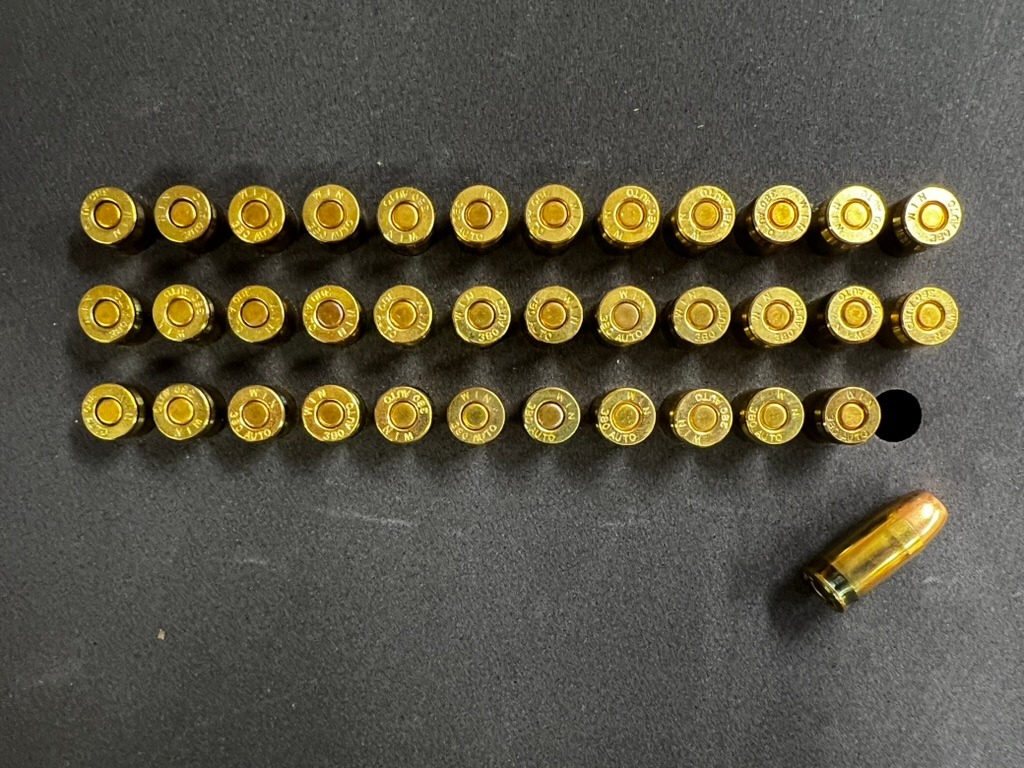
Can an insert help me notice when a tool is missing?
Yes. A dedicated pocket for each tool gives you a visual place to return it, so an empty pocket makes missing tools easier to spot before you leave the bench or close a case. Engraved labels can make the check even faster by showing what belongs in each pocket.
Who is responsible for measurements and fit?
You are responsible for verifying design accuracy, dimensions, compatibility, and fit for your specific items and storage system.
How do I choose the right pocket fit?
Choose based mainly on whether the insert will stay stationary or travel in a case.
Standard · Mobile storage
Uses closer clearance that grips the object. Choose Standard when a case will be carried or transported and limiting movement is more important than the easiest possible removal.
Easy pull · Stationary storage
Adds extra clearance for easy removal. Choose Easy pull for drawers, cabinets, workbenches, and cases that normally remain stationary.
Your selection becomes the insert default, but you can choose a different fit for an individual pocket. Consider adding a finger notch or finger-access pocket when an object is difficult to grip from above.
Choosing Insert Thickness
Choose an insert that fits the storage space, supports the object, and leaves the amount of the object you want exposed for removal. Thicker is not automatically better—the correct thickness is the smallest option that provides the pocket depth and protection you need without interfering with a drawer, lid, shelf, or other contents.
Leave room for thickness variation
Insert thicknesses are nominal. Foam sheets have normal manufacturing tolerances, so their actual thickness can differ slightly from the listed size. When several sheets are laminated together, those small differences can add up. Adhesive between layers and compression during assembly can also affect the finished thickness. Leave some clearance instead of choosing an insert that exactly matches the available inside height. For example, in a case with 4 inches of usable inside height, a 3.5-inch insert is a better starting choice than a 4-inch insert, provided it supports the pocket depths you need.
Also allow for items protruding above the insert, lid foam, and any ribs or other obstructions. The half-inch clearance in this example is a planning allowance, not a stated manufacturing tolerance or a guarantee of fit. Check clearance with your items in place before closing the case.
Prebuilt outlines do not prescribe a thickness
A prebuilt outline matches the footprint of a known case, drawer, or storage system. Its default thickness is only a starting point, and its maximum allowed thickness is a fit limit—not a recommendation. You may need a thinner option based on the objects being stored, the pocket depth you need, how much of each object should remain exposed, and the actual lid or drawer clearance in your setup. Always evaluate the thickness for your particular use, even when the outline already matches your case.
Start with these three measurements
- 1. Usable storage depth
Measure from the surface supporting the insert to the lowest lid, drawer, shelf, gasket, hardware, or other obstruction. Check several locations when the space is uneven.
- 2. Object thickness
Measure the object in the exact orientation you will store it, including any battery, bit, cap, cable, optic, or other attachment that remains installed.
- 3. Desired exposure
Decide how much should sit above the pocket for an easy grip. More exposure improves access; less exposure provides more side support and retention.
Adjust for the application and storage system
Shallow drawers and trays
Favor a thinner stack that clears the drawer above and keeps controls or handles easy to reach. Confirm clearance with the tallest object in place, not just the empty insert.
Stationary cabinets and benches
Prioritize access and visibility. A shallower pocket can be appropriate when the organizer stays level and the object does not need strong transport retention.
Portable and travel cases
Favor enough pocket depth to support the object during movement. Also verify that the loaded object clears the closed lid and that any lid foam contacts it only as intended.
Uneven or molded case bottoms
Measure at the insert footprint and watch for ribs, wheel wells, handles, or slopes. Use the most restrictive usable depth and make sure the insert will be supported instead of rocking or bridging a large void.
Adjust for the object
Thin, light, or frequently used objects
Leave enough exposed to grip the object comfortably. A finger notch or larger finger-access pocket may improve removal without requiring a shallower main pocket.
Tall, heavy, fragile, or irregular objects
More side support may be useful, but keep important controls, delicate features, and natural grip points accessible. Do not use foam depth as a substitute for required load restraint or protective packaging.
Important checks before ordering
- The 0.5-inch insert is one thin sheet of foam, so each pocket is cut completely through it. The object rests on the bottom of the drawer or case rather than on foam. Choose a thicker insert if you want foam underneath the object.
- Pocket depths follow the available foam-layer boundaries shown in the configurator, so confirm that the selected stack offers a suitable depth.
- Test lid and drawer clearance with the tallest object installed, and leave a practical allowance for measurement and material variation.
- You are responsible for confirming the final measurements, fit, support, and suitability for your storage system and application.
Tips and Tricks
A few practical ways to make your layout easier to use. Treat these as starting points, then check the finished design against your actual drawer, case, and items.
Start with a simple pocket shape
For many objects, a basic shape such as a rectangle can be the best and most flexible pocket. It can accommodate different items without needing an exact traced outline. Rectangle pockets also work well as parts trays for screws, fittings, and loose parts, or for small objects that are difficult to trace. Leave enough room to reach in and pick up the smallest item, and choose a closer-fitting outline when secure retention matters.
Leave access room at the back of a drawer
If your drawer does not pull all the way out, items placed too close to the back may be hard to remove. Keep frequently used or taller items farther forward and test how your hand reaches them before ordering.
Put finger notches where you naturally grip
Place a finger notch beside the part of the item you would normally grab. Keep it on an exposed pocket edge and away from nearby pockets so there is room for your finger.
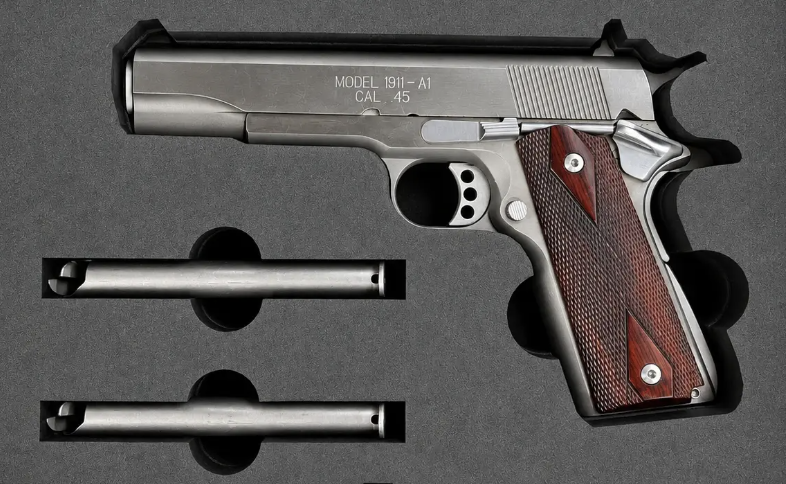
Finger notches along exposed pocket edges leave room to reach and lift each item. Add a rectangle for a larger finger pull
When a finger notch is not enough, overlap a small rectangle with the item pocket to create a wider place to reach in. If several small objects sit next to each other, one shared rectangle can be more efficient than adding a separate pull for every pocket. Make the shared shape only as large as needed so the surrounding foam keeps proper support.
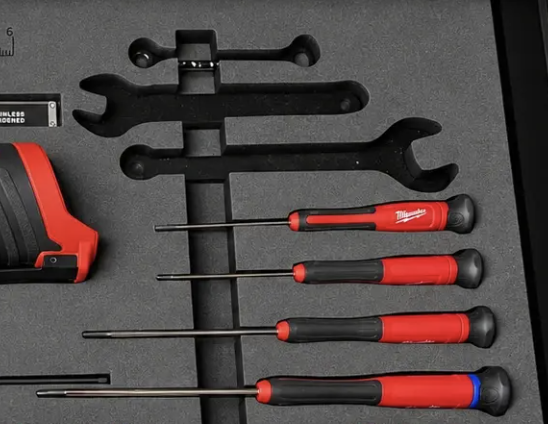
A shared pull opening can make several neighboring small objects easier to grab. Give thin or pointed items extra length
Extend the pocket slightly beyond a narrow or pointed tip. A little extra room can make the item easier to place and remove without the tip catching on the foam.
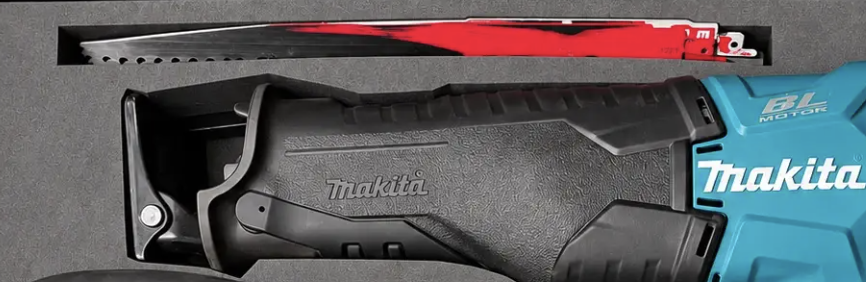
Extra length beyond a thin or pointed tip helps prevent catching during placement and removal. Trace the item as you plan to store it
If a tool will stay stored with its battery, bit, socket, or other attachment, include those parts when taking the photo or drawing the outline. Allow space for attached bits and batteries, including room to place and remove the tool easily. Confirm the complete setup still fits your drawer or case height.
Trace the edge, but simplify snag points
Follow the object's outside edge closely, but avoid copying every tiny gap, deep notch, or tight inside corner. A smoother outline is often easier to use and less likely to catch the item as you lift it out.
Photo Trace
How do I create a pocket from a photo?
Photo Trace turns a clear top-down photo into an editable pocket outline. See the Photo Trace guide for photo placement diagrams, tracing instructions, sizing, and final checks.
Materials and Manufacturing
Can I design foam inserts for handgun cases, magazines, and ammunition storage?
Yes. Use the web builder to create a custom foam layout for a handgun case, magazines, or boxed ammunition. Start with your case dimensions, size and arrange the pockets, and add labels to keep the contents organized. Check your measurements and lid clearance before ordering. Foam inserts provide organization; they do not secure a firearm or replace a locking storage container.
Are GripPlan inserts custom made?
Yes. Every insert is hand-laminated and custom CNC-cut to match your submitted design, measurements, and layout selections.
What foam does GripPlan use?
GripPlan uses closed-cell XLPE foam because it gives custom inserts a clean, professional finish with a suede-like surface feel. It is firm enough to hold objects securely, cuts with crisp pocket edges, and stands up well to regular shop, garage, and jobsite use, off-road kits, travel cases, and other general organization setups.
Softer foams can work for simple padding, but they often feel spongier and can lose shape faster over time. XLPE gives GripPlan inserts the structured look and reliable fit customers expect from a made-to-order organizer.
We use softer XLPE for the bottom layer so it conforms better to the bottom of the case. Denser XLPE is used for the grip layers to create firmer pocket walls and more secure retention. Laminating these layers by hand allows us to create variable pocket depths while combining those properties in one finished insert.
How does foam handle water and temperature?
Closed-cell XLPE resists water absorption and can be cleaned with mild soap and water, but the finished insert is not a waterproof seal. Avoid soaking it, and let it air-dry completely before returning it to the case.
The foam is intended for normal storage, transport, shop, and jobsite conditions. High heat can deform the foam or weaken the lamination, so keep the insert away from open flames, hot surfaces, and prolonged extreme heat.
How does engraving work?
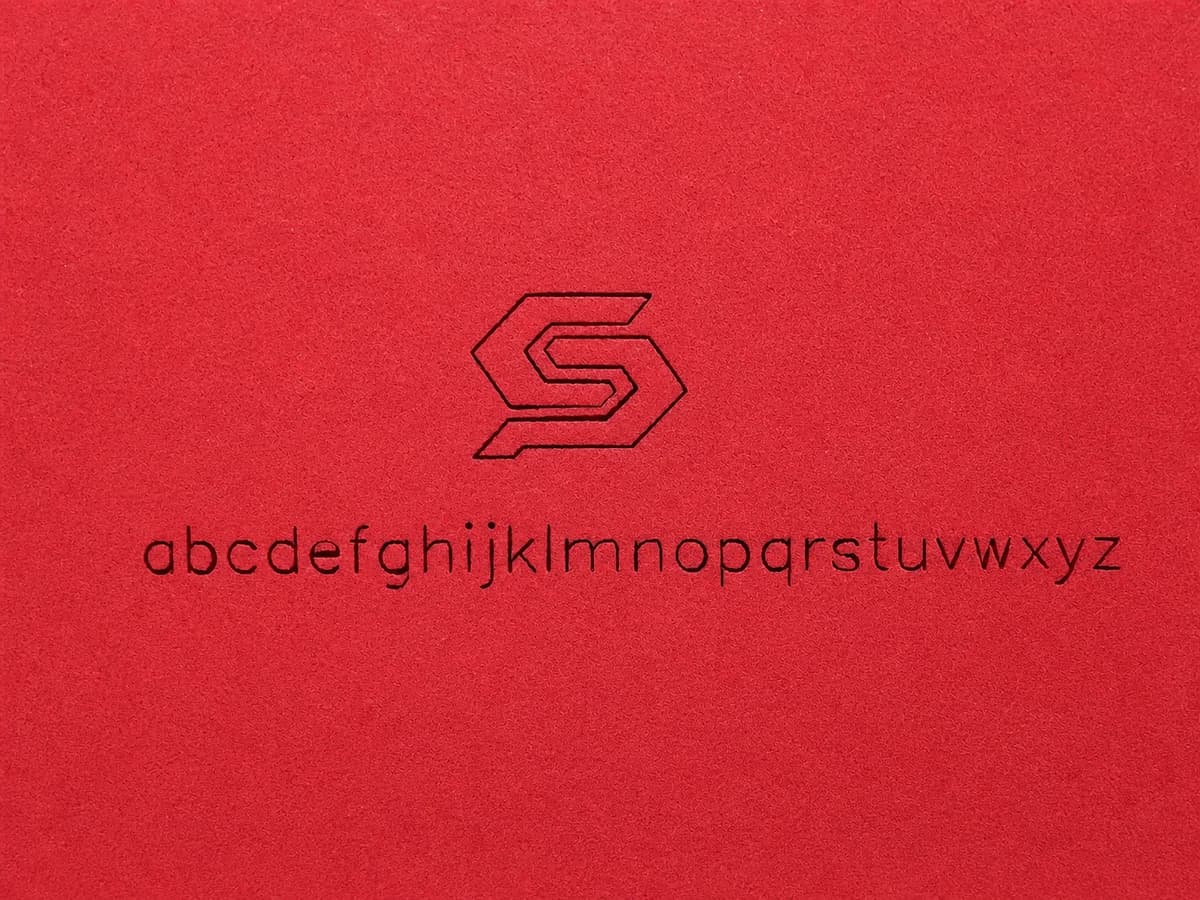
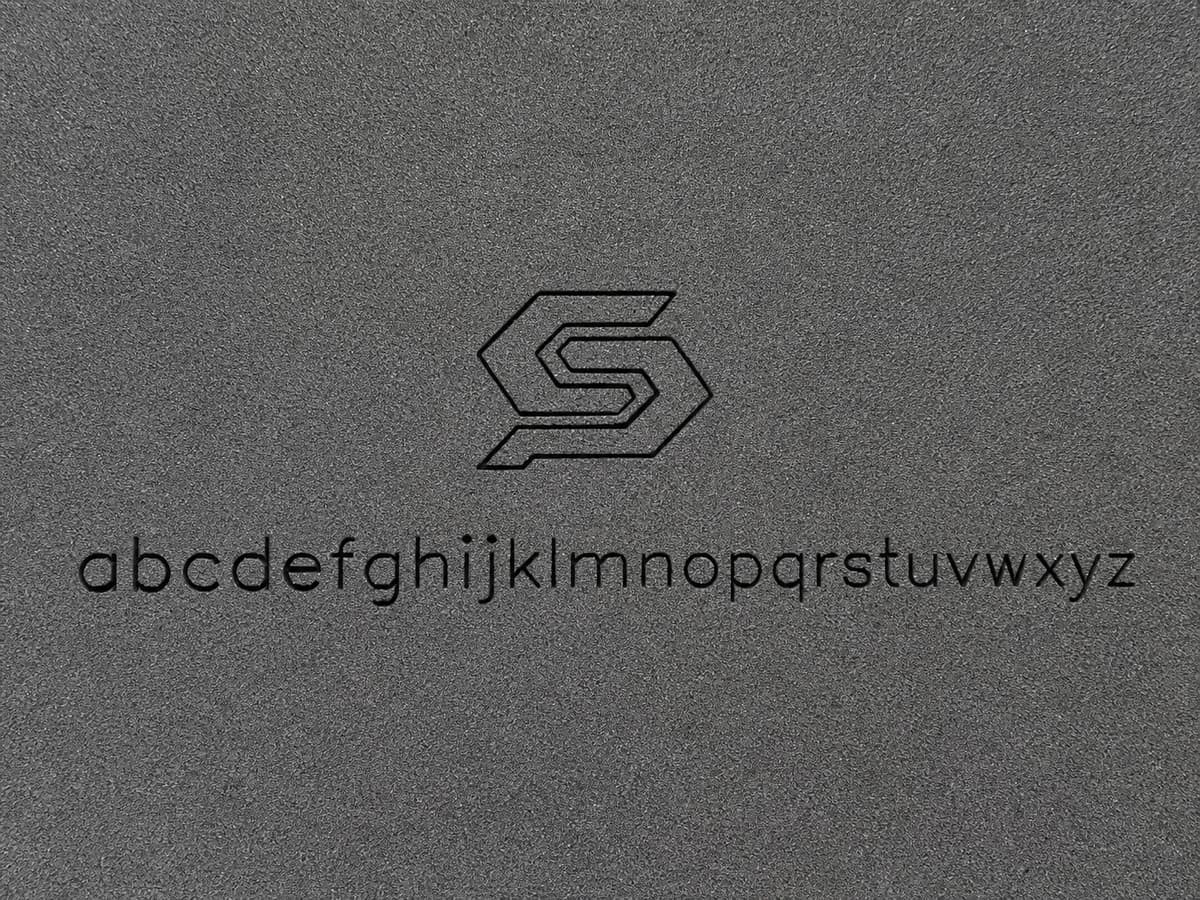
Engraving is laser-etched directly into the foam, removing a small amount of material to create a permanent mark—it is not ink, paint, or an applied printed layer. The mark can appear darker or more contrasted than the surrounding foam, and its appearance can vary with texture, material variation, wear, and deformation. In the configurator, you can add text, icons, utility markings, or eligible artwork.
Engraving can be placed on the top surface or completely inside a pocket when the design has enough foam below it. All available foam colors can be engraved on a top surface or exposed pocket floor.
Should I engrave the top surface or the bottom of a pocket?
Top surface: Labels remain visible while items are stored, but need exposed foam between pockets and can be obscured by overhanging items. They avoid direct pressure from the item, though handling can still cause wear. Pocket bottom: Labels save space and help identify missing tools or where items belong, but are usually hidden while stored and can experience rubbing or compression.
Pressure can permanently deform the foam as it conforms to the stored object, which may distort pocket-bottom lettering or make it harder to read—especially with small text or concentrated pressure. Choose top-surface labels when they need to remain visible; use pocket-bottom labels for returning items and checking for missing tools. Where space allows, use 0.25-inch text and keep pocket-bottom lettering away from concentrated contact points. The effect depends on the foam, load, storage time, and temperature, and does not mean every label will become unreadable.
You can also use both in the same insert: top-surface labels for identification while items are stored, and pocket-bottom labels to identify empty pockets and help return items to the right place.
Text can be as small as 0.15 inch, but may lose some detail at that size.
In the examples below, the letters use the 0.25-inch size and the logo is 1 inch wide.
Will every insert look and fit exactly the same?
GripPlan selects commercially available XLPE foam for durable custom organization, but foam and custom manufacturing naturally involve small variations. Actual thickness, density, color, texture, dimensions, and fit may vary slightly from nominal measurements, photos, samples, or another insert. Foam may also compress or relax slightly over time.
Minor surface impressions, scuffs, color variation, edge variation, or similar cosmetic marks that do not affect normal organizational use are not considered defects. Exact, airtight, or perfectly uniform fit is not guaranteed, so customers should verify their submitted measurements and choose the appropriate fit setting.
How do I install and care for my insert?
Find optional adhesive strip instructions, foam cleaning tips, light surface cleanup, and removal guidance in the insert setup and care guide.
View Insert Care GuideWhere are GripPlan inserts made?
GripPlan is Michigan-based, and inserts are designed, CNC-cut, and assembled in Michigan using U.S. and imported materials.
Account and Email
What should I do if I do not receive a GripPlan email?
Check your junk, spam, promotions, or quarantine folder first. Verification links, password reset links, order confirmations, and shipping updates are sent to the email address on your account or checkout, and some mail providers may filter automated messages.
Orders and Shipping
Can I order a larger quantity of an insert I have already checked?
Yes. Increase the quantity in your cart, up to the current request maximum. Orders above our standard quantity or dollar limits are submitted for approval instead of immediate payment. In the cart, tell us if you have received and checked an insert made from the exact same design, and include the previous order number if available. We review each larger run individually.
For an untested or changed design, we recommend ordering one insert first to check fit. If your quantity exceeds the request maximum, contact us to discuss the run. See current ordering limits on the pricing page.
Can I request a remake credit or bulk discount?
For a remake, choose “Request a remake credit before payment” in your cart and include the original order number and details. We review credits individually; submitting a request does not guarantee a credit or charge your card. For a larger run, ask about pricing in your review notes. Any approved discount appears on your saved order before you accept it. Shipping is separate unless explicitly waived. If the full amount is covered, confirm the approved order without entering payment details.
What happens when my order needs approval?
We save your submitted design, quantity, price and shipping address without collecting payment. We check the request for manufacturing feasibility, shipping and available production capacity. We may approve it, decline it or ask you to make changes and submit a new request. Approval applies only to that exact order.
How do I pay after approval?
We email you a link to your saved order. Sign in and select Pay now through Stripe to complete checkout yourself. You can also find the payment button on your Orders page if the email is delayed or filtered. Approval does not automatically charge your card. Production begins after payment is confirmed, or after you confirm an approved order with no payment due.
Your order shows the payment deadline. If approval expires, contact us to request renewal. If you need to change the design, quantity or shipping address, submit a new order for review.
Why might a smaller order also need review?
We consider the combined value of your open orders, so splitting a purchase does not avoid the review limit. A request may also need scheduling when our production backlog is full. You can submit it for review, but payment remains unavailable until there is enough capacity. A review request does not reserve a production slot.
How long does it take to build and ship an insert?
Most custom inserts are built and delivered within about 1–3 weeks. Timing can vary with the design, material availability, current order volume, and carrier transit. We will keep you updated as your order moves through production and ships.
Can I cancel, return, or refund a custom order?
Custom orders are generally non-cancelable and non-returnable once production starts, except where required by law or where expressly stated in writing. If we determine that a submitted design cannot be manufactured exactly as ordered, we will cancel and refund the order rather than alter the ordered design. The customer can then correct the saved design and place a new order.
Can GripPlan decline or cancel an order?
Yes. GripPlan may decline, cancel, or refuse all or part of a request for lawful reasons such as manufacturing or safety limitations, material or capacity constraints, suspected fraud or abuse, policy violations, legal restrictions, or other reasonable operational considerations. We may also refuse to create or engrave offensive, hateful, threatening, harassing, obscene, discriminatory, defamatory, unlawful, or otherwise inappropriate words, symbols, images, graphics, or designs. If we cancel before fulfillment, we will provide an appropriate refund for the unfulfilled portion where applicable.
Where do you currently ship?
We currently ship to the contiguous U.S. (lower 48 states) only. At this time we do not ship to Alaska, Hawaii, U.S. territories, APO/FPO addresses, or P.O. boxes.
Legal and Product Limits
Are these inserts structural or load-bearing?
No. GripPlan inserts are non-structural, non-load-bearing, and intended for organization only.
Is GripPlan affiliated with Milwaukee, DeWalt, or other brands?
No. GripPlan is not affiliated with, endorsed by, or sponsored by third-party tool or case manufacturers. Brand names are used only for compatibility reference.
What about warranty and liability?
Products are provided as allowed by applicable law under the Terms of Service, and GripPlan's total liability is limited to the purchase price of the product at issue.
Can GripPlan disable or remove accounts?
Yes. As described in the Terms of Service, GripPlan may suspend, deactivate, or terminate accounts for lawful reasons, including security, policy violations, and prolonged inactivity.
Legal summary only. See full terms: Terms of Service.
Contact
Need help beyond the FAQ? Visit the contact page for the full form, or email us directly and we will route your message to the team.